MCVSAID

Spare Android phones. One button. A directed multi-camera show.

MCVSAID turns spare Android phones into a synced, self-healing camera rig for OBS. One Mac or Linux computer runs it. Cut the show by hand, or let a vision model on that same computer choose the shots, and steer it in plain words as the show goes. No cloud, no subscription, and no footage leaves the building.

The demo is the real dashboard running in your browser with six simulated cameras. Nothing is connected.

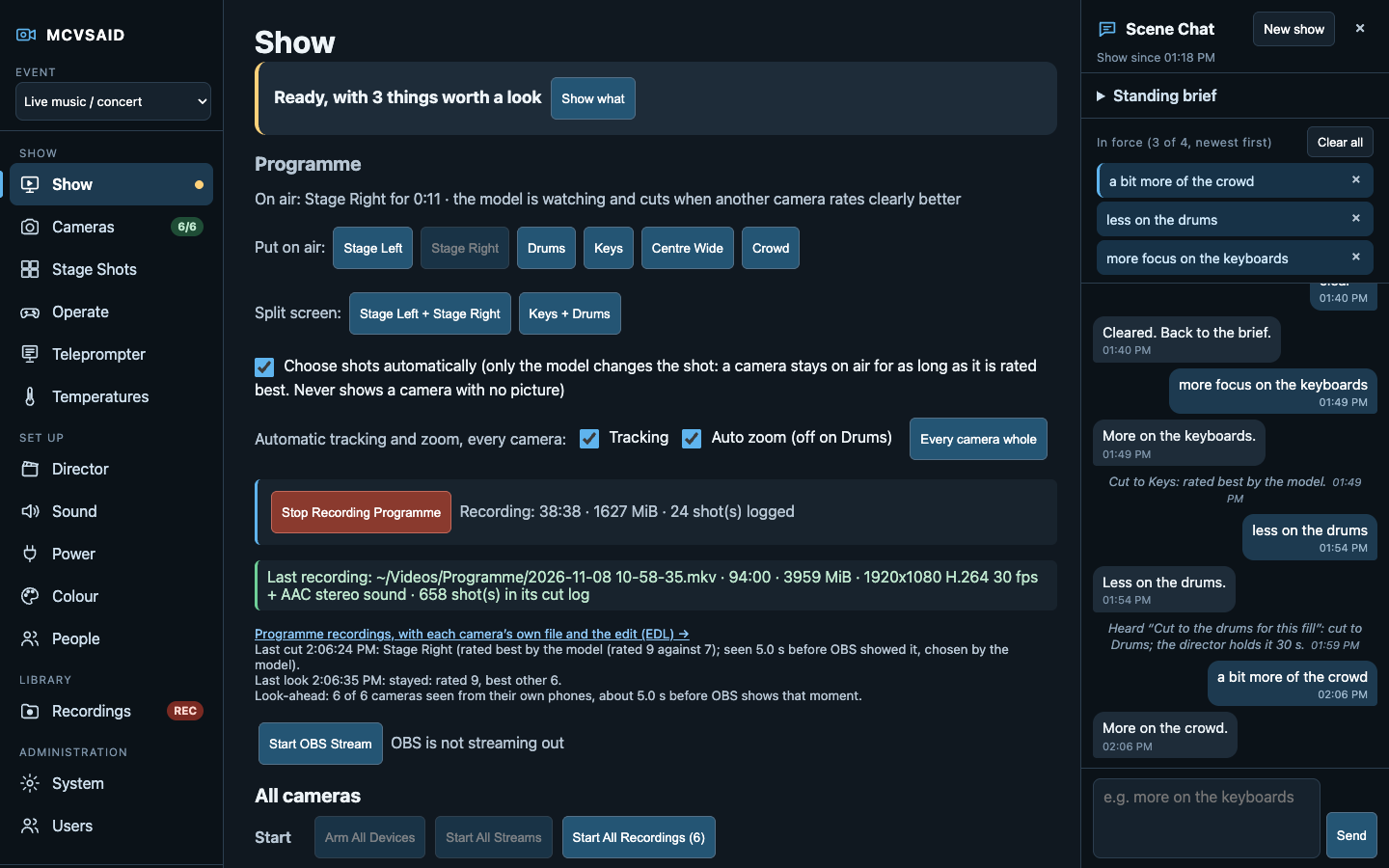
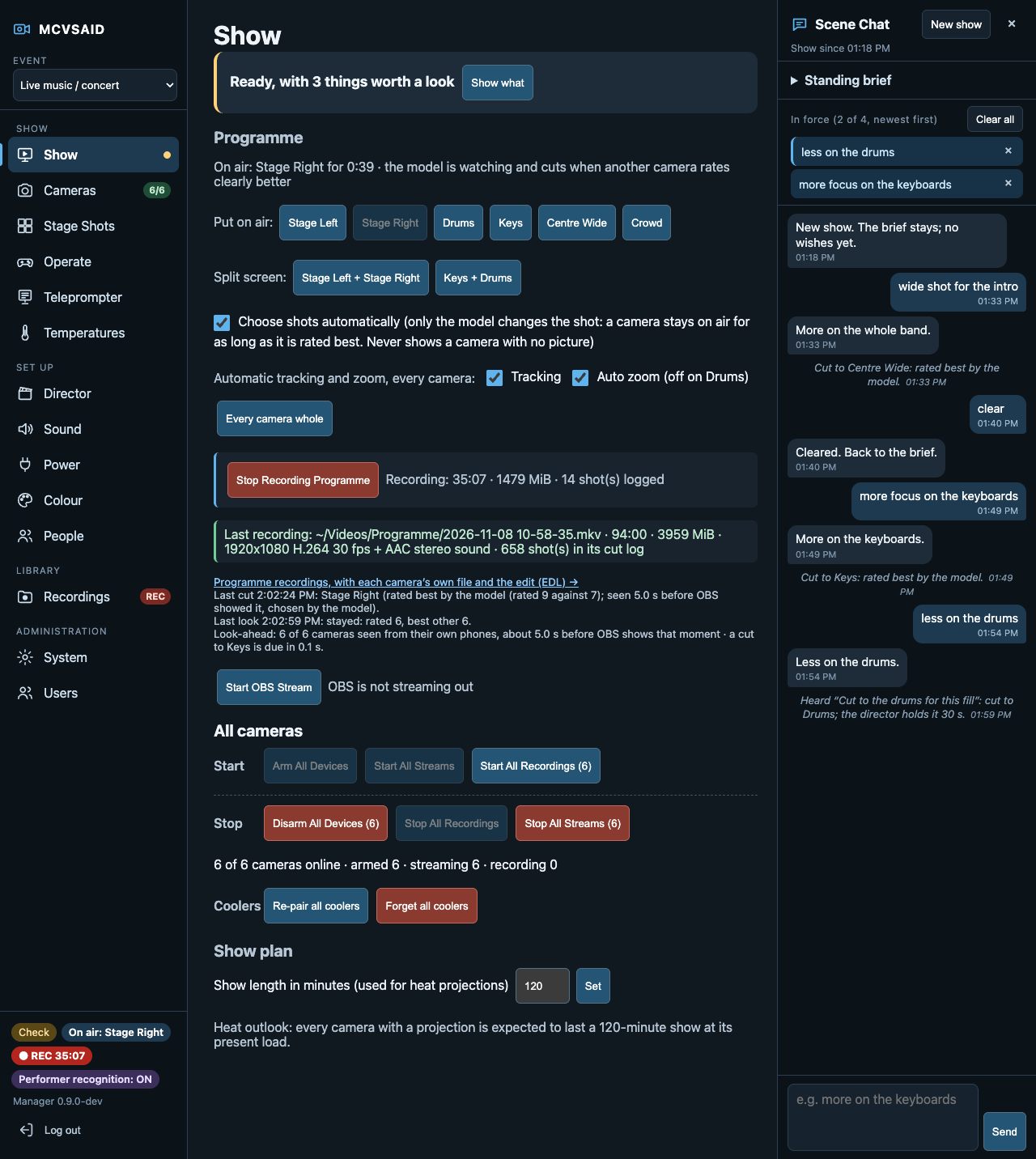
The Show page: every camera streaming, the programme being recorded

At a glance

Most phone multicam tools stop once the feeds reach a switcher. MCVSAID covers the whole chain: setup, health, sync, colour, shot choice and edit-ready recordings.

No camera operators neededA handful of spare phones and one computer make a directed multicam show.
Mount the phones onceSet them up, match their colour, update and fix them from a browser.
A director that looks firstThe programme runs a few seconds behind, so every cut is seen before it airs.
Your show, your computerThe model runs locally. Nothing is sent to the project or a cloud service.
The AI's cut is a starting pointEvery show comes with each camera's own file and the edit.
Everyone logs in as themselvesEach person has a role, and the audit log names who changed what.

What it does

Every picture below is from the demonstration manager: made-up cameras and drawn pictures, not a real show.

Every camera recording or streaming, at one press

The Show page arms, starts and stops every camera together, and one readiness line checks the computer, OBS, the network and every phone, then says what needs attention and how to fix it.

A factory-reset phone taps its welcome screen six times, scans a code and joins, with no cable. From then on it revives a frozen picture, rejoins Wi-Fi and holds its battery short of full by itself.
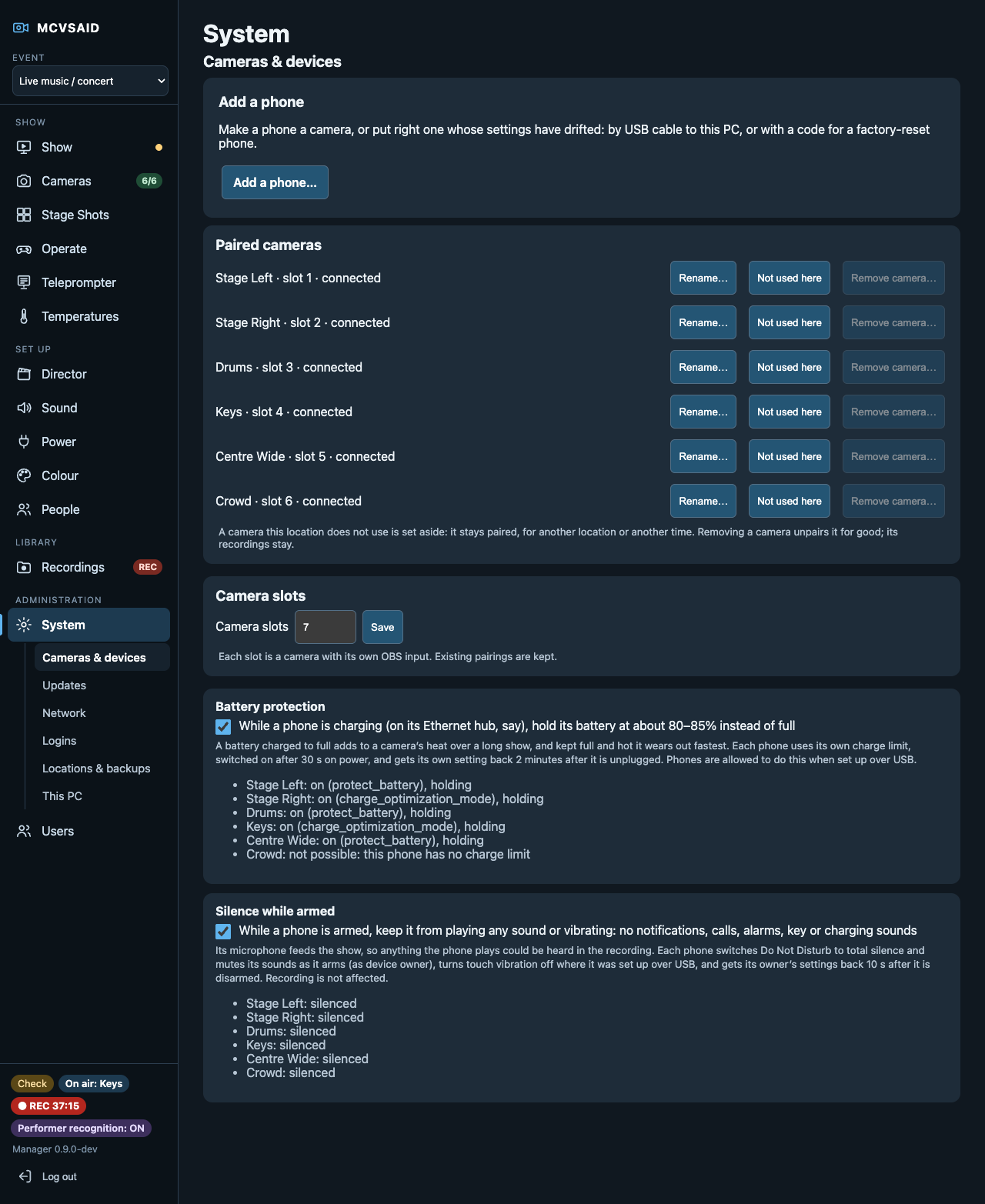
Adding a phone: a setup code to scan

A director that sees the shot before the audience does

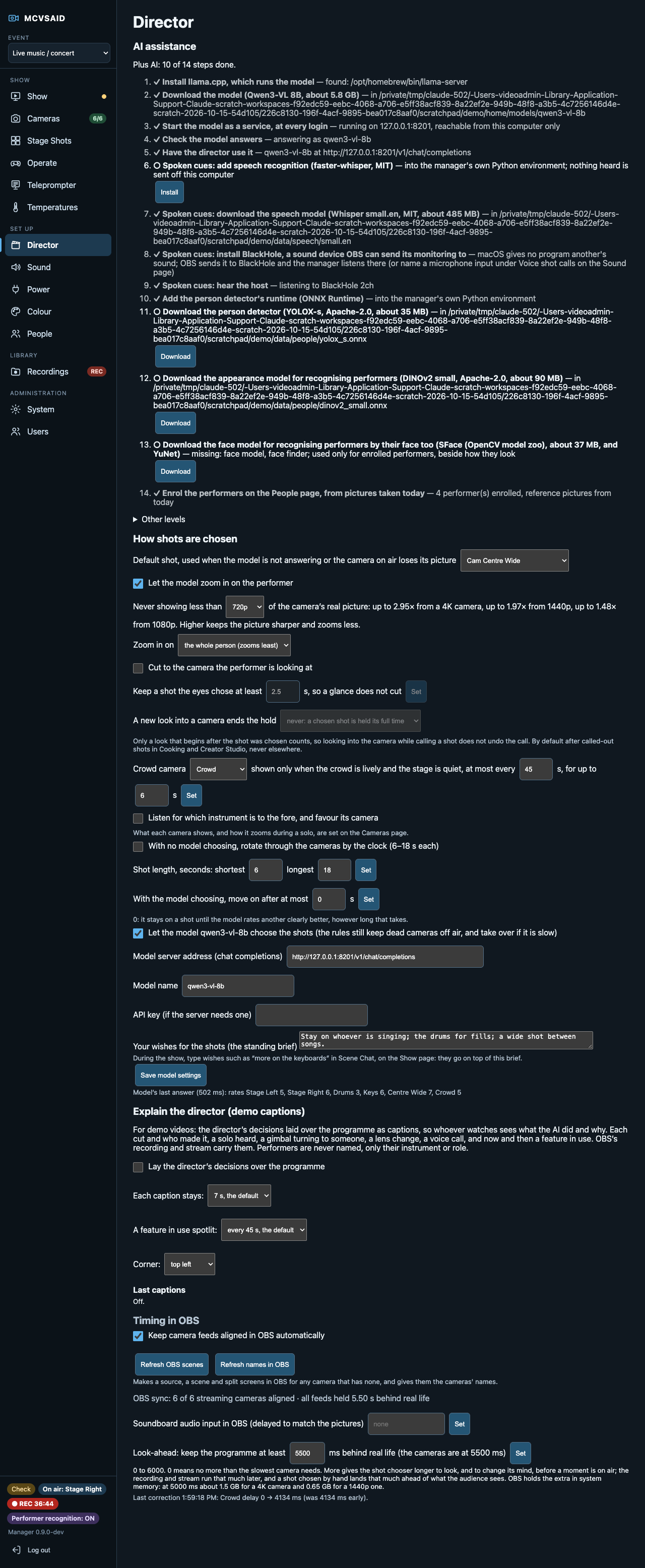
A vision model on your own computer rates every camera from the phones' own pictures, a few seconds ahead of the programme, so it can tell an empty or blurred shot from a good one before cutting to it.

AI is optional: choose none at all, the model alone, or the model plus recognition of consenting performers.

The Director page: how shots are chosen

Direct it in plain words, or out loud

Give the director a brief ("stay on whoever is singing; the drums for fills"), then steer it mid-show with Scene Chat: "less on the drums". The log explains every cut.

A host can call shots aloud, "cut to the overhead", with speech recognised on the computer and nothing heard sent anywhere or kept.

Scene Chat beside the Show page

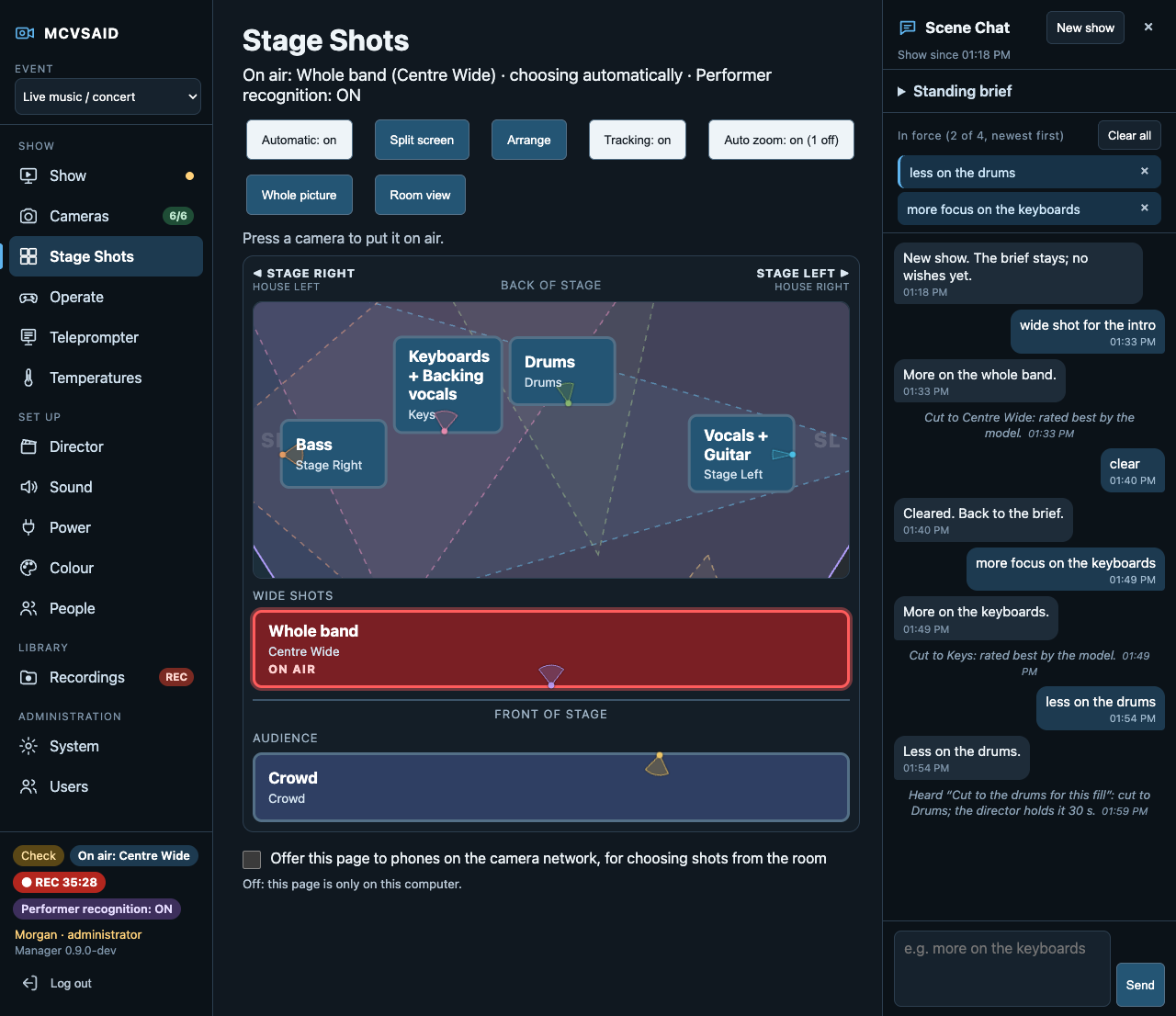
Stage Shots: cut by hand, as the stage stands

The cameras laid out as they stand on the stage, by what they show. Press one to put it on air, or two for a split screen. A room map places each camera and shows the wedge it sees.

Share it with a phone in the crowd behind a passcode, or run it from a tablet.

Stage Shots: the cameras laid out as on the stage

Robotic cameras for the price of a phone gimbal Experimental

Put a phone on a Hohem iSteady X3 or MT3 and aim it from the dashboard, or press Follow and it keeps a face in frame by itself. Save targets such as the pot or the guitar stand and send the camera there by voice.

Or take over from a tablet with an Xbox controller.

A camera on a gimbal, following a face

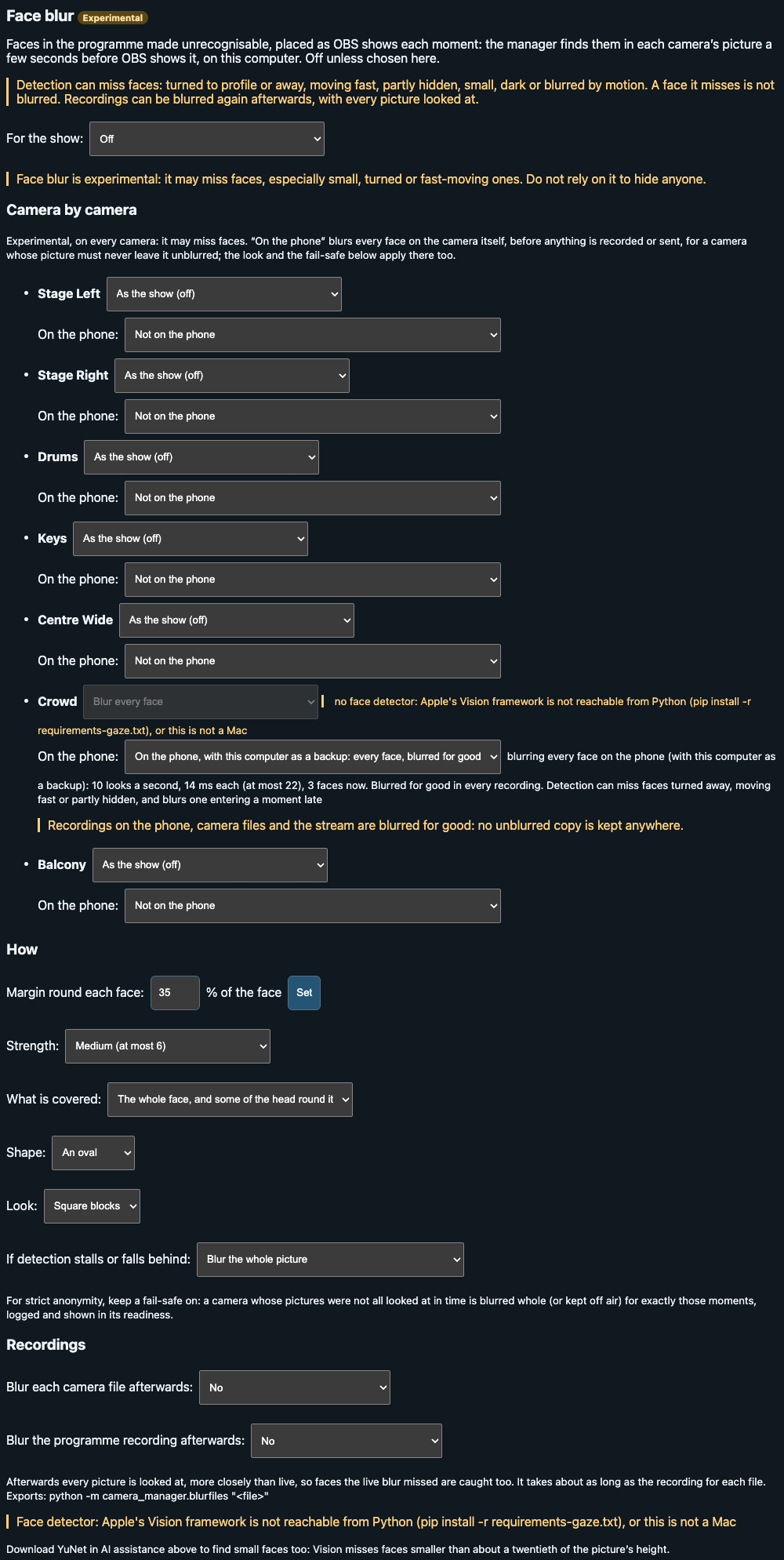
Faces blurred on the phone, before anything leaves it Experimental

For an audience camera, a congregation or a school event, the phone blurs every face before encoding, so no unblurred copy exists anywhere. The computer can back it up, covering faces the phone missed.

It can still miss faces, so don't rely on it to hide anyone yet.

Face blur settings for a camera

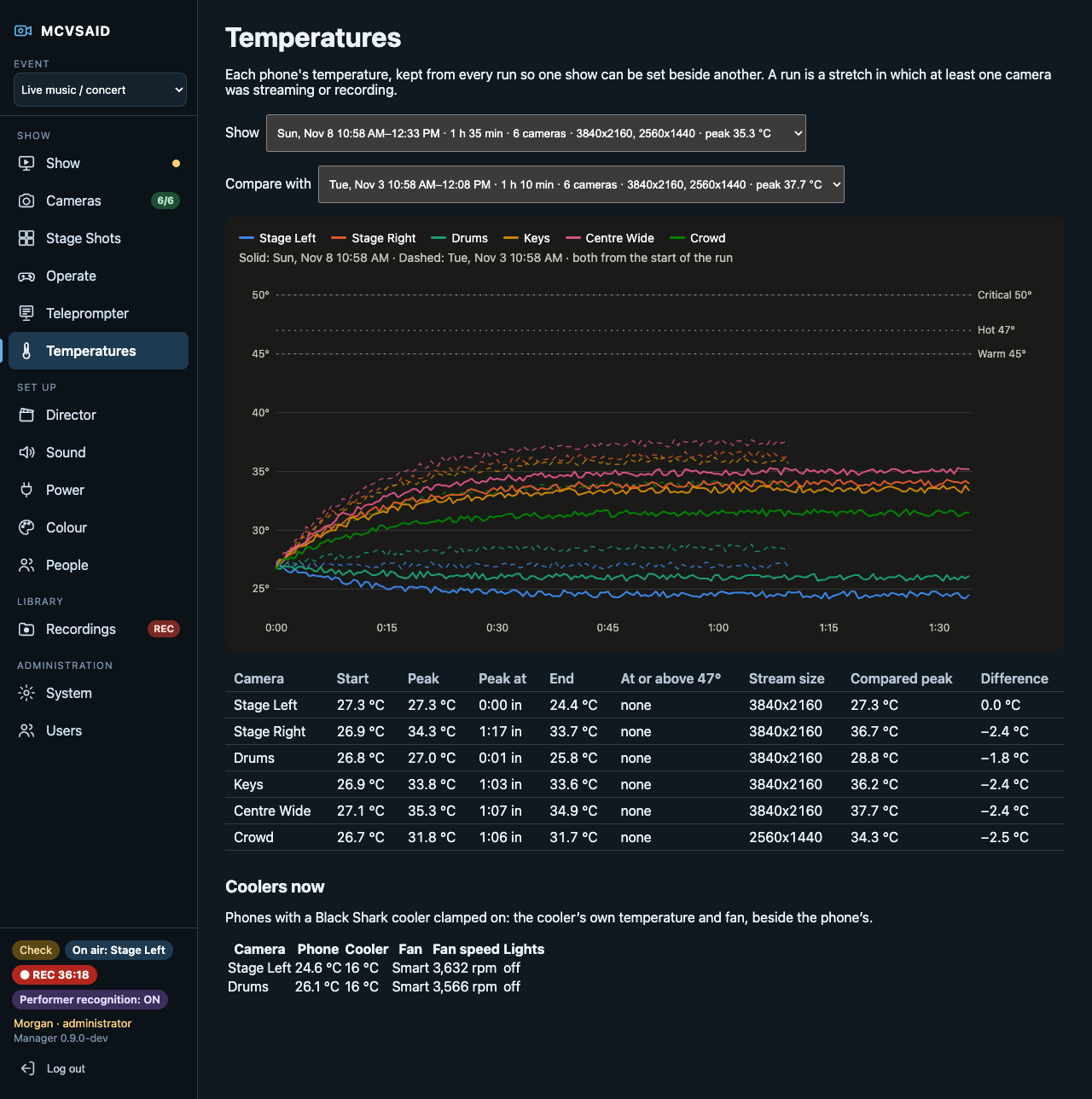
Heat treated as a first-class problem

Each phone's temperature, trend and forecast against the planned show length, with runs compared side by side. Clip-on Black Shark coolers are controlled over Bluetooth Experimental, and the hubs that charge them can sit on Tapo smart plugs.

Temperatures, run by run

Sync, sound and colour that match

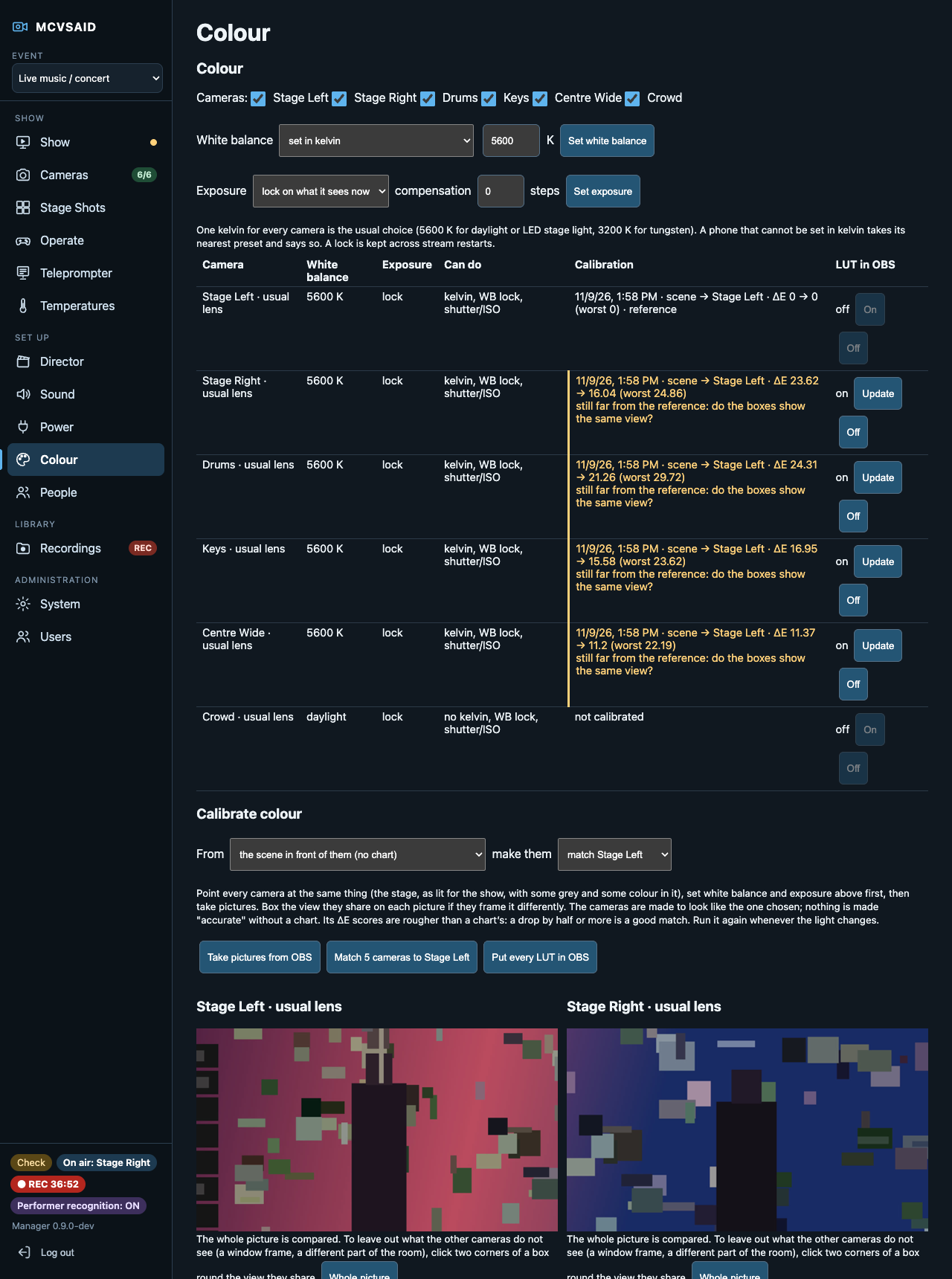
A hidden timing strip lines every feed up to the frame, and Calibrate sync lines each camera's sound up with its picture. One page sets white balance and exposure on every phone and builds a LUT for each camera.

The Colour page: matching every phone

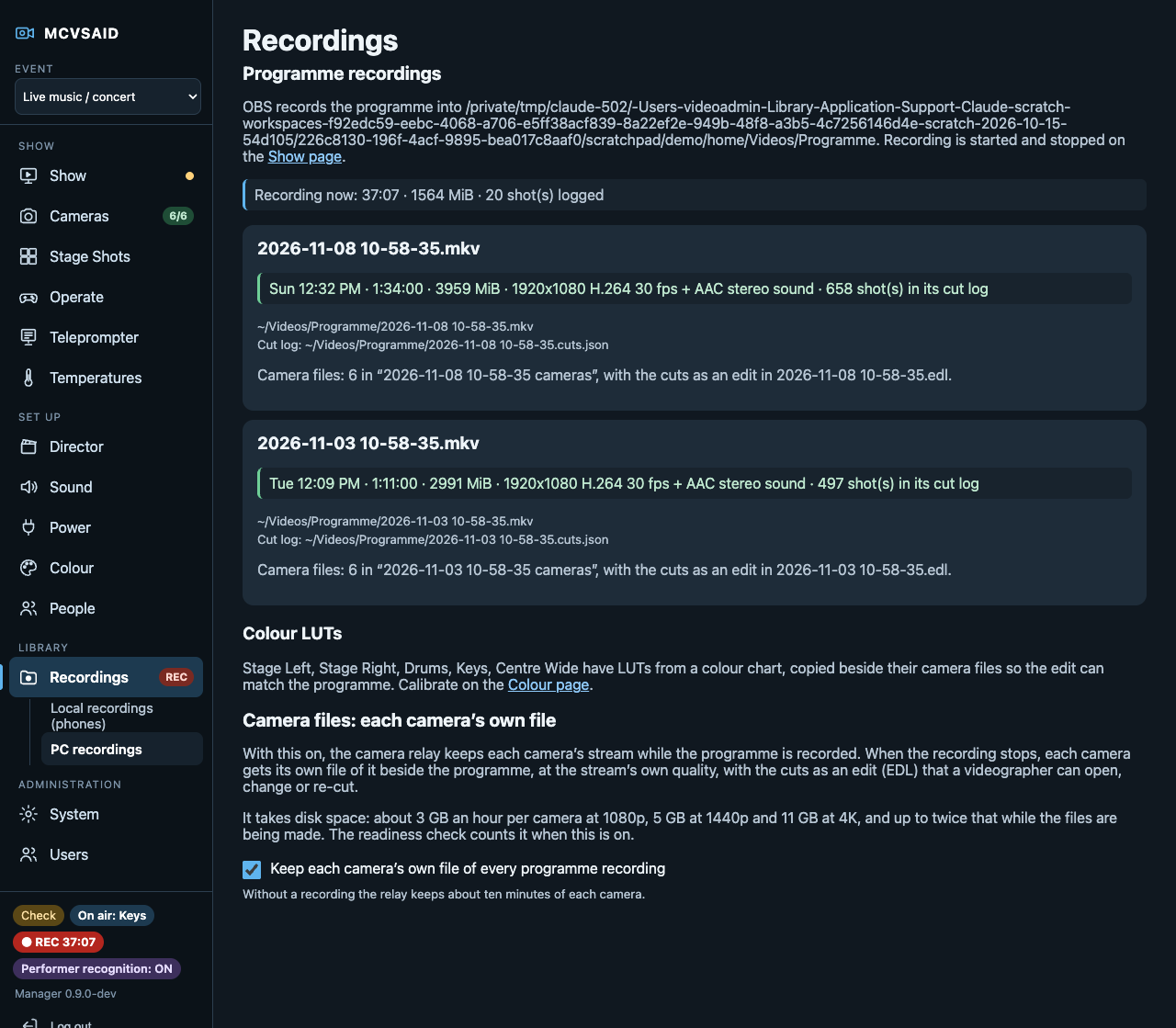
Recordings ready for the edit

Every programme recording comes with a file per camera, the cuts as an EDL for Resolve, Premiere or Final Cut, and each camera's LUT. Recordings made on the phones are copied over and verified after the show.

Recordings on the production computer

Made for the kind of event you film

Each kind of event has its own camera roles, pacing and way of choosing shots, and a set of its own on the room map.

Live musicChurch servicesPodcasts and talk shows Panels and conferencesTheatre and comedyCooking shows Karaoke nightsCreator Studio

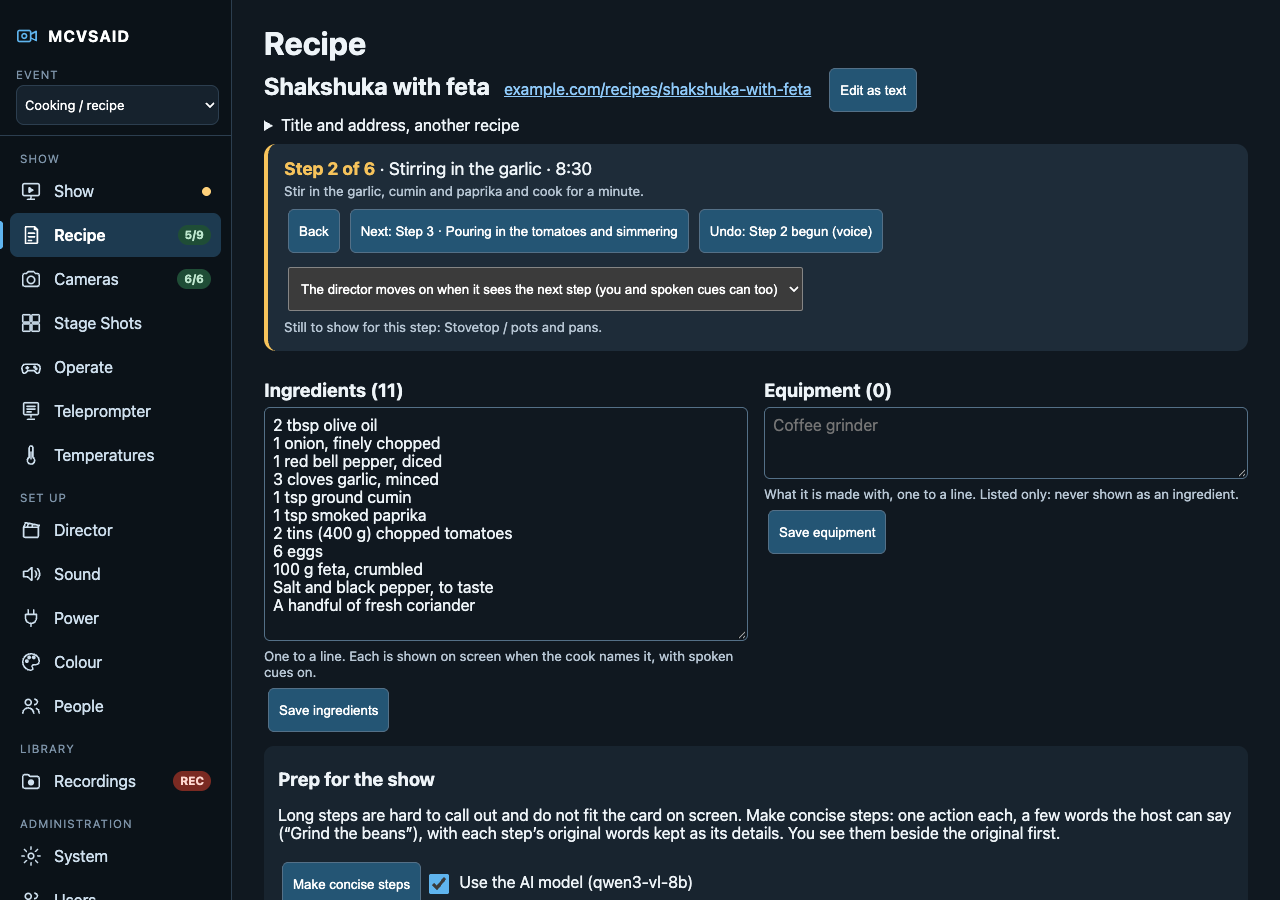
Cooking: the recipe on screen when it matters

Prep for the show turns a long recipe into short steps the cook can call out, and the recipe card goes on screen always, at key moments, or only when asked.

The Recipe page

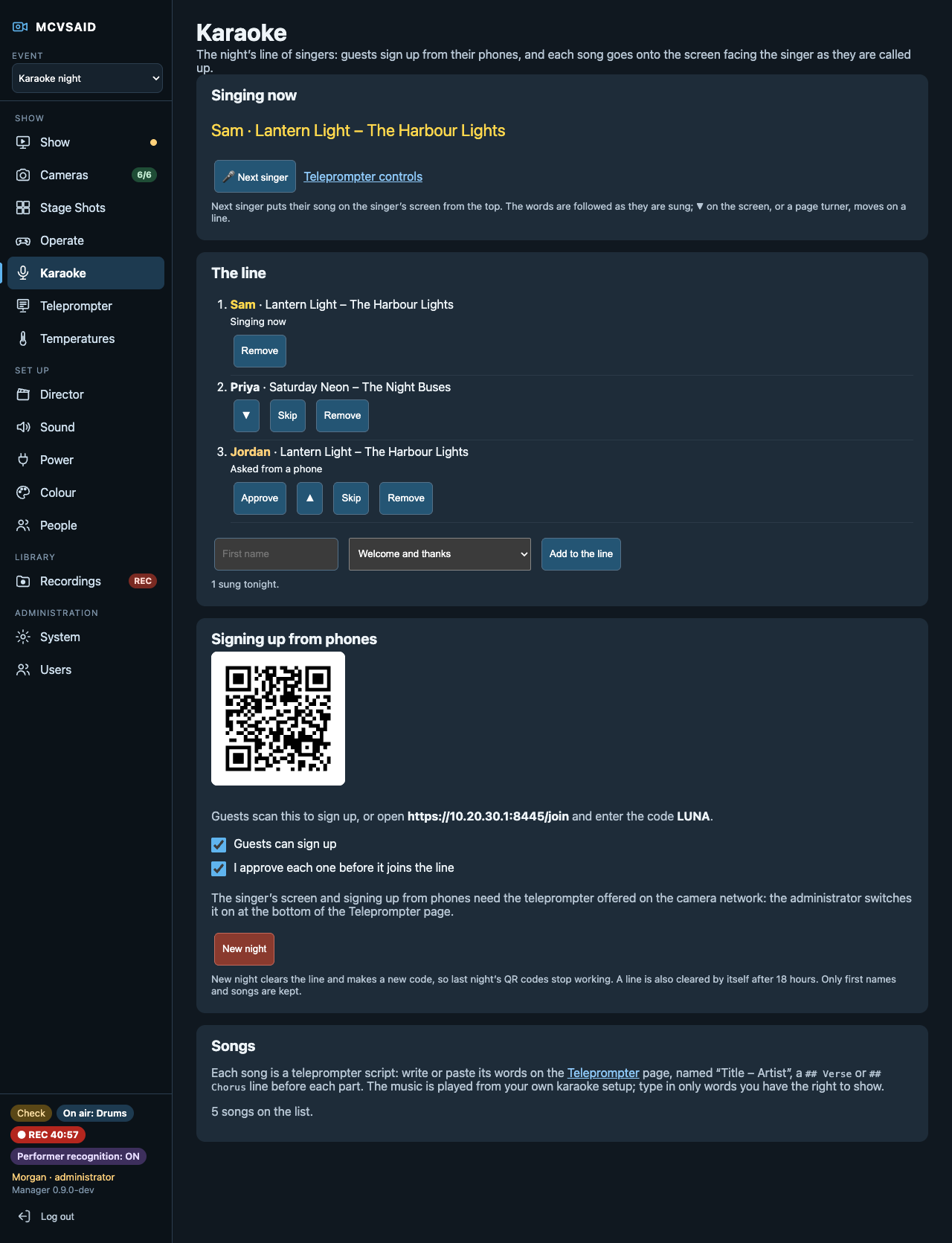
Karaoke night, run from the dashboard

Guests sign up from their phones with a QR code, the host calls up each singer, and the words go on a screen facing them, lit as they are sung.

The Karaoke page

How it works

Phones stream picture and sound to OBS on one production computer. The MCVSAID manager on that computer keeps them in step and chooses or takes the shots. Everything is run from a browser.

Set up the phones

Factory-reset spare Android phones, scan a code, and the signed app installs itself and joins the camera network.

Mount them once

On stands, rigging or gimbals, out of reach if you like. Arm, update, colour-match and repair them from the dashboard.

Run the show

Cut by hand on Stage Shots, or let the director cut and steer it as you go. Record, stream to OBS, or both.

What it needs, and what it doesn't do yet

Said plainly, before you set aside any phones.

  • A capable production computer. Tested on a gaming laptop with 32 GB of memory and 16 GB of graphics memory, and on a MacBook Pro with an M5 Pro and 48 GB. Smaller machines haven't been tested yet.
  • Dedicated phones. Camera phones must be spare, factory-reset devices: the app becomes each phone's device owner.
  • Android and OBS. Cameras are Android only, and output goes through OBS.
  • A few seconds of delay. The programme runs behind real life by design, so the director sees each moment first.
  • Heat. Without a cooler, phone heat still limits recording on the phone during a long show.
  • Experimental parts. Face blur can miss faces. Gimbal and cooler control use commands worked out from the makers' own apps, and only the Hohem X3 and MT3 and the Black Shark MagCooler 5 Pro have been tried.

Why MCVSAID: what it does that others don't, and how it compares →

Join the private beta

If you film live events with phones, at a church, a theatre, a school, a venue, a band, a podcast or a kitchen, email beta@mcvsaid.com with:

  • what you film, and how often;
  • the computer you would run it on (Mac or Linux, and its memory);
  • the phones you could set aside for it, and your network.

Testers get the manager, a tester guide and a direct line for feedback.

Found a security problem?

Please tell us privately at security@mcvsaid.com, never in a public issue. Say what you found, how to make it happen and what it would let someone do. We reply within a week and say when a release with the fix is out.